 Microsoft Teams for Students to Join Meeting
Parents should be checking their email (provided on student registration form) for an invitation to join the Teams Meeting. In the email, click the “Join Microsoft Teams Meeting” link.

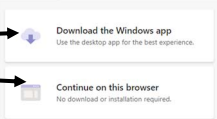
You will then have the option to download the program or open Teams on the web.
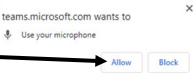
If you see the message below ………. Click the “Allow” button.

Enter your name and choose your video and audio settings.
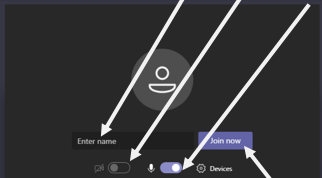
Click the “Join Now” button to be admitted into the meeting. You will be put into the meeting lobby until the Instructor accepts you into the meeting. If you have not been admitted into the meeting within 15 minutes of joining, you will need to join again.